How to Log In to Muse AI (muse.ai, App, WhatsApp & Sign-Up Guide)
To log in to Muse AI, go to muse.ai in a browser or open the Muse from Meta app, then enter the mobile phone number or email address linked to your Meta account. You will receive a verification code by SMS or email — enter it on the page and you are in. If you already use Facebook or Instagram, you can also sign in through those accounts.
That is the whole process. But people run into a handful of predictable problems: they forget which sign-in method they used, the verification code never arrives, they see a “not available in your region” message, or they cannot tell the real muse.ai apart from copycat sites. This guide covers the login steps first, then each of those fixes in the order people actually need them.
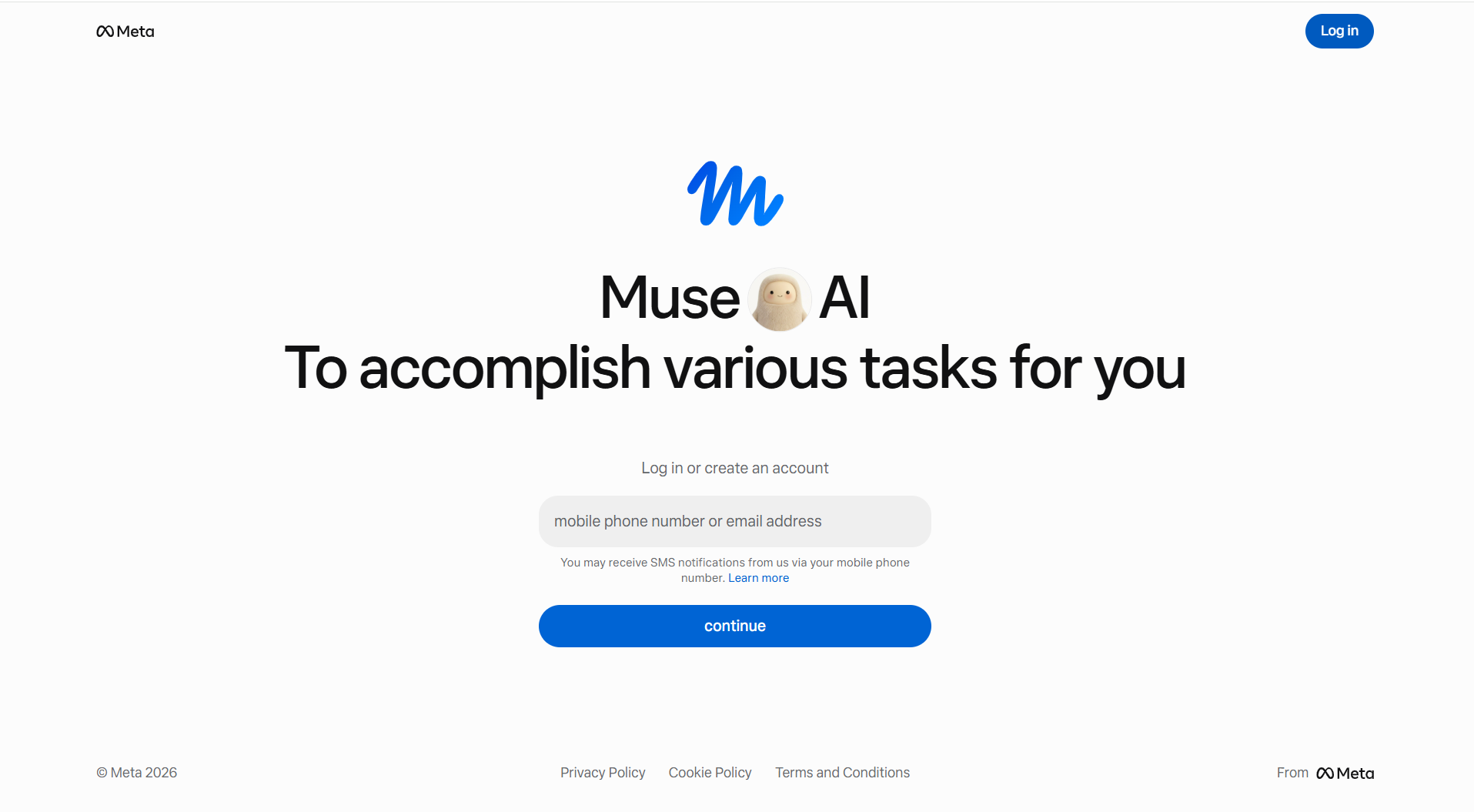
How to Log In to Muse AI on the Web (muse.ai)
The web version works the same on Windows, Mac, or any computer browser:
- Open muse.ai in your browser and check the address bar carefully — the real page shows the Meta logo and a single field that says “mobile phone number or email address”.
- Enter the phone number or email connected to your Meta account.
- Click Continue.
- Enter the verification code Meta sends you (SMS if you used a phone number, email if you used an address).
- Once you are in, you land in your Muse workspace and can start a task.
One detail worth knowing: logging in and creating an account use the same field. If your number or email already has a Muse account, the page signs you in. If it does not, the same box starts the sign-up flow. There is no separate “register” button to hunt for.
How to Log In to the Muse App (iOS and Android)
On a phone, the steps are nearly identical:
- Open the Muse from Meta app — check that the App Store or Google Play listing names Meta as the developer, because several unrelated apps use the name Muse.
- Tap Log in.
- Enter your Meta account phone number or email, or continue with Facebook or Instagram if that is how your account was created.
- Enter the verification code you receive.
For everything the agent can do once you are signed in, see our complete guide to using Muse AI.
Muse also works inside WhatsApp, Messenger, and Instagram DMs in supported regions — there, you chat with Muse like a contact, and it is tied to the same Meta account. A Mac app exists too, and it signs in with the same credentials as the web.
How to Sign Up for Muse AI (New Account)
If you do not have a Meta account yet, sign-up takes about two minutes:
- Go to muse.ai and enter a phone number or email you actually check — this is also how you will recover the account later.
- Click Continue and enter the verification code.
- Follow the setup prompts. Muse asks for basic preferences and a display name for your agent.
- Depending on your account, you may be asked to verify your age (Muse is 18+) or add a payment card. Not sure whether the card will cost you anything? Our Muse AI pricing guide breaks down the free tier versus Power and Maximum. TechCrunch reported at launch that a card is requested even on the free tier — it is a $0 verification, not a charge.
You do not need a Facebook or Instagram account to sign up. Meta accounts can be created with just an email address or phone number.
Why Can’t I Log In to Muse AI?
When a login fails, it is almost always one of these five reasons:
- Wrong sign-in method. If you created the account with an email, signing in with a phone number creates a brand-new empty account instead of finding yours. Always use the method you registered with.
- Verification code not arriving. Check the country code on your phone number, check spam folders for email codes, and avoid requesting codes back-to-back — repeated requests can trigger a temporary block. Wait a few minutes and try once more.
- “Not available in your country or region.” Muse launched in the United States (September 8, 2026) and Canada (September 18, 2026) for adults 18 and older. Outside those countries, the login page may load but the service will not. This is a rollout limit, not a bug — and using a VPN to fake your region violates Meta’s terms and has been reported to risk account suspension.
- Multiple Meta accounts. If you are signed into a different Meta account elsewhere in the same browser, sign out of the others first, then log in with one clear account.
- Browser problems. Clear cookies for muse.ai, disable extensions that block scripts, or try a private window. Then sign in again.
If you are locked out entirely, use Meta’s official account recovery at accountscenter.facebook.com rather than any third-party “Muse support” service.
Is muse.ai the Right Login Page? (Avoid Fake Sites)
Yes — muse.ai is Meta’s official Muse web address. The confusion comes from two places. First, search results also turn up ai.meta.com/muse, which is the product information page, not the login. Second, several unofficial sites rank for terms like “Muse AI login” and some promise free tokens or redemption codes. Meta has no such codes.
Three quick checks before you type anything in:
- The address bar must read exactly muse.ai — no extra words, no hyphens, no .net or .io lookalikes.
- The real login page shows the Meta logo and a single “mobile phone number or email address” field.
- Meta never asks for your password or a verification code over chat or email. Anyone who does is not Meta.
One more naming trap: Muse was also the name of a well-known British rock band, and several AI music and writing tools use the word “Muse” too. The developer listed on the app must be Meta.
Do You Need Facebook or Instagram to Log In?
No. A Meta account is required, but not a Facebook or Instagram account. Meta’s help documentation says you can create a Meta account with an existing Facebook or Instagram profile, or with just an email address or phone number.
The practical difference shows up at login: if your Meta account was built on top of a Facebook or Instagram profile, you will usually sign in through that route. If you registered with a standalone email or phone number, you sign in with that instead. Neither method is better — the only rule is to stay consistent, because switching methods is the single most common cause of “my account is gone” panic that turns out to be a duplicate empty account.
Muse AI Login on Windows — Is There an App?
Not yet. There is no Windows app for Muse as of October 2026. Microsoft announced on October 7, 2026 that a native Windows app is coming, but Meta has not given a release date.
Until then, Windows users get Muse through the browser at muse.ai — same account, same workspace, same secure cloud environment that runs Muse’s tasks. The only thing missing is a dedicated app window. Mac users have it better: a native Mac app exists and can even control other applications on the Mac with your permission.
Muse AI Login on WhatsApp, Instagram and Messenger
In supported regions you can reach Muse without any login screen at all. Open WhatsApp and start a chat with Muse, or find it in Instagram DMs and Messenger. Because those apps already know who you are, Muse inherits your account from there.
Two things to know before using it this way. First, it is the same Muse — tasks started in WhatsApp continue in the app or on the web, because everything runs on your one Meta account. Second, third-party reviewers including Wired have reported Muse sometimes reading private messages without being asked when it has access to Meta-app context. If that concerns you, review what Muse can access in your account settings before connecting it to your social accounts.
What to Do After You Log In
Once you are in, three settings take a few minutes and are worth doing before your first real task:
- Turn off training data sharing if you prefer. In Data controls, the “help improve AI models” option is on by default and applies to past chats too.
- Check connector permissions. Muse works by connecting to services like Gmail, calendars, and shopping sites. Grant access per task rather than everything up front.
- Name your agent and set preferences — this is what makes Muse feel personal rather than generic, and you can change it later.
Then start small: a research question, a draft document, or a simple errand. The heavy multi-step tasks — purchases, bookings, emails — work best once you have seen how Muse asks for approval at sensitive steps.
FAQ
How do I log in to Muse AI?
Go to muse.ai in a browser or open the Muse from Meta app. Enter the mobile phone number or email address linked to your Meta account, click Continue, and enter the verification code Meta sends you. You can also sign in through Facebook or Instagram if your account was created that way.
How do I sign up for Muse AI?
Visit muse.ai, enter a phone number or email you regularly check, and click Continue. The same field handles login and sign-up. Verify with the code you receive, complete the setup questions, and your account is ready. Muse is available to users 18 and older in the United States and Canada.
Do I need a Facebook or Instagram account to use Muse?
No. Muse requires a Meta account, which you can create with an email address or phone number alone. Facebook and Instagram are just two of the ways to set one up. The important thing is to log in with the same method you registered with.
Why is Muse AI not available in my country?
Muse officially launched in the United States on September 8, 2026 and in Canada on September 18, 2026. Meta has not announced other countries yet, so people elsewhere see a region message at login. Using a VPN to bypass this violates Meta’s terms and risks account suspension.
Why am I not receiving the Muse verification code?
Check that your phone number’s country code is correct, look in your email spam folder if you used an email address, and avoid requesting multiple codes in a row, which can trigger a temporary block. Wait a few minutes, then request one code and enter it promptly.
Is muse.ai a real Meta website?
Yes. muse.ai is Meta’s official Muse web address and the correct login page. ai.meta.com/muse is the product information page. Be cautious of unofficial sites ranking for Muse login terms that promise free tokens or codes — Meta does not offer those.
References
- Meta Newsroom — Introducing Muse: The World’s First Personal AI Agent Built for Everyone
- Meta Newsroom — The Future Is for Everyone: Muse for Small Business
- TechCrunch — Meta debuts its Muse AI agent. Will consumers trust it?
- Microsoft Windows Experience Blog — Building Windows for hybrid intelligence
- WIRED — Meta’s Muse Is Better at Surveilling Than Helping Me
- Mashable — Meta’s Muse reportedly keeps files on everyone you love
