How to Build an App with Atoms (No Code)
Create a free Atoms account → open a project and describe your app in Project Chat → the agents build it → review in App Viewer → Publish, then connect a custom domain or export the code. You need no coding: the whole build happens in plain language. The Free plan costs $0 and gives 15 credits per day.
Disclosure: this page contains an affiliate link. If you sign up through it, we may earn a commission — it costs you nothing extra.
Atoms app build steps
- Create an account at atoms.dev. Email sign-up, no card required for the Free plan.
- Start a project and pick what you’re building — a website, a web app, or an internal tool. The choice changes the starting template, so don’t skip it.
- Write the brief in Project Chat. This is the step that decides whether you get something usable or a generic demo. Give it five things: who uses the app and what they must finish in one session; the 3–4 screens, in order; the data fields each record needs; who can log in and what each role can do; what is explicitly out of scope for version one.
Build a client intake tool for a two-person design studio. Screens: a list of clients with status, a client detail page with project notes, and a form to add a new client. Fields: name, company, email, project type, budget range, status. Two roles: owner can delete, assistant can edit but not delete. Email/password login. Out of scope: invoicing, file uploads, email sending.
- Check the result in App Viewer. Click through every screen before you type another message. Write down the specific things that are wrong (“the save button sits under the table on a phone”), not a general feeling.
- Iterate one change at a time. “Add a filter by status above the table” works. “Make it better” produces a new layout you didn’t ask for and burns credits.
- Connect what the app needs. Accounts and data live in Atoms Cloud (database, authentication). API keys go in the keys/secrets area, not in the chat.
- Publish. You get a live URL. Paid plans add a custom domain; you can also export the code or sync it to GitHub if you want to own the stack.
Atoms limits worth knowing before you start
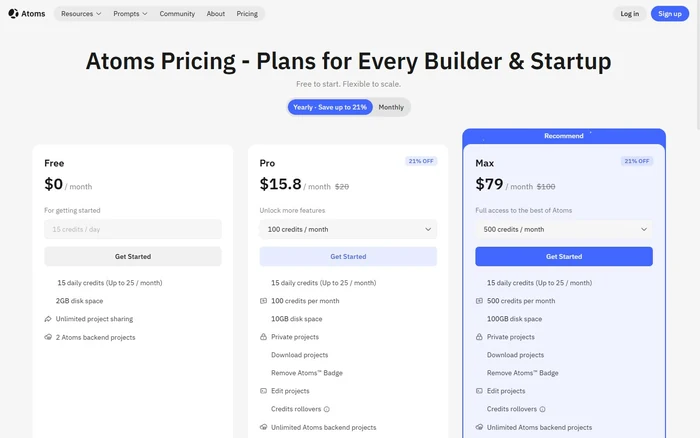
| Free plan | $0, 15 credits/day, 25/month — enough for one small project, not for a week of heavy iterating |
| Pro | from $20/mo for 100 credits; 250 credits = $50, 350 = $70 |
| Max | from $100/mo for 500 credits; higher tiers up to 10,000 credits, plus Race mode (runs one prompt on several models) |
| Credit rollover | Unused credits carry over one month only, not permanently |
| Yearly billing | Saves up to 21% (Atoms’ own pricing page) |
| Code quality | You get a working prototype, not audited production code. Before you take payments, review authentication, permissions, and how user data is stored |
Two practical warnings. First, credits disappear faster than you expect when you keep re-generating instead of writing a better brief — spend the time on step 3. Second, test on a phone before you launch: generated layouts tend to look right on desktop and break at 375px wide.
Pricing and limits checked on atoms.dev/pricing, 21 October 2026. Plans change — confirm on the site before you buy.
Sources
- Atoms pricing — plan tiers, credits, rollover rules
- Atoms Help Center: Welcome to Atoms — account, workflow, output types
- Atoms Help Center: Project Chat — chat, App Viewer, files, Atoms Cloud
- Atoms homepage — product scope and positioning
Related: How to Use ChatGPT Audio Uploads
