How to Write a Screenplay with Laper
Create a free Laper account → start a Screenplay project and pick Hollywood or Asian format → write scene by scene (formatting is automatic) → select a scene range and ask the AI Script Doctor what isn’t working → invite collaborators and export. The free Junior plan covers 2 screenplay projects and 10 AI chats per month.
Disclosure: this page contains an affiliate link. If you sign up through it, we may earn a commission — it costs you nothing extra.
Laper screenplay writing steps
- Create an account at laper.ai. The Junior plan is free and doesn’t ask for a card.
- Start a Screenplay project and choose the format — Hollywood or Asian. This decides margins, element styles and pagination for the whole document, so set it first instead of fixing it later.
- Write normally in the editor. Scene headings, action, character cues, parentheticals, dialogue and transitions get formatted as you type, and pages paginate on their own. Type the story, not the spaces.
- Build the structure view before you rewrite. Add your scenes as cards and mark the beats each one carries. This is the fastest way to see a dead middle: if acts two and three carry the same beat twice, you don’t need better prose, you need to cut a scene.
- Ask the AI Script Doctor diagnostic questions, not rewriting requests. Select the scene or act first, then ask: “What stops working in this scene, and what does the reader lose if I cut it?” “Which character has no goal in this act?” “Where does the tension drop between the midpoint and the climax?” Questions like these return notes you can act on. “Rewrite this scene” returns someone else’s voice, which is the thing screenwriters actually hate about AI tools.
- Fix it yourself, then re-run the diagnosis. The loop that works: diagnose → rewrite one scene → re-diagnose that scene only. Credits go fast if you re-scan the whole draft after every line.
- Invite collaborators when the draft is stable. Multiple writers edit the same project live, and comments stay attached to the script instead of scattering into email.
- Pull storyboards from the script when you need visuals. Character portraits, location references and shot frames are generated from the same screenplay, so the deck matches the draft you’re actually shooting.
Laper plans and limits
| Junior | $0 | 10 AI chats / month | 2 screenplay + 2 film + 2 novel projects |
| Senior | $20/mo | 500 | 3 + 3 + 3 |
| Elite | $60/mo | 2,000 | 20 + 20 + 20 |
| Master | $100/mo | Unlimited | Unlimited |
| Legend | $400/mo | Unlimited | Unlimited |
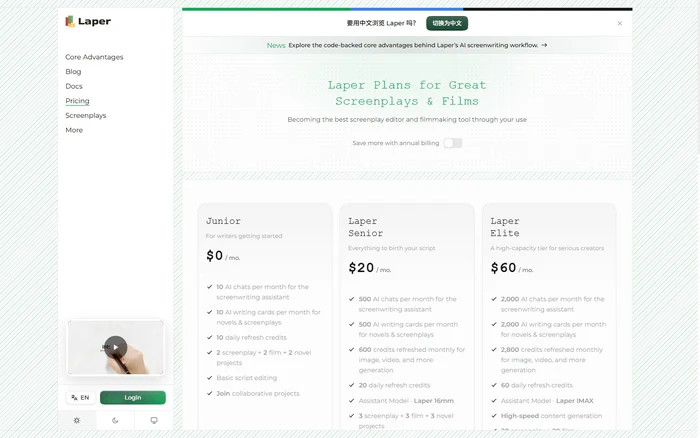
What that means in practice: 10 AI chats a month is roughly one serious diagnosis session. If you plan to use the Script Doctor on every act, budget for Senior. Image and storyboard generation runs on a separate credit pool (600 credits at Senior, 6,000 at Master), so heavy storyboarding costs more than writing does.
Two honest caveats. Laper is a screenplay tool, not a script generator — if you want the AI to produce pages for you, this isn’t the product. And AI notes are only as good as the scope you select: ask about the whole draft and you get generic advice; ask about one scene and you get something usable.
Pricing checked on laper.ai/pricing, 21 October 2026.
Sources
- Laper pricing — Junior, Senior, Elite, Master, Legend tiers and credit pools
- Laper product page — formatting, structure view, Script Doctor, collaboration, production assets
- Laper docs — workflow documentation
Related: How to Use ChatGPT Audio Uploads
